
A good Content Management System, or CMS, can help immensely in creating and maintaining websites. However, an often overlooked benefit of using a CMS is its impact on SEO.
SEO, or Search Engine Optimization, is a critical aspect of website development and maintenance. Google search algorithms take in several factors to evaluate site rank, and some of those factors are aspects directly affected by your CMS of choice.
Your CMS Platform can affect performance and other key areas, such as site speed, compatibility with mobile devices, and metadata. Therefore, you must have a deep understanding of CMS and what it can do to improve overall technical SEO quality and user experience.
In this article, you will learn:
What is a CMS?
A Content Management System, commonly known as CMS, is an application which allows website developers to create pages and content as well as manage them without the need for conventional technical knowledge such as coding and design.
CMS platforms are commonly used to create simple to intermediate-level sites such as blogs and e-commerce stores. The platform allows for easy maintenance of content such as adding pages, products, and content such as images or videos and can provide additional functionalities and support for plug-ins and other third-party services.

What are the Key Features of a CMS?
Different CMS platforms offer different functionalities. There are also often tiers that will unlock features depending on your subscription. At its core, however, almost all CMS platforms share these fundamental features:
1. Content Management
One of CMS’s main features is that users can effortlessly create, maintain, and publish content without the need for technical knowledge in typical web-related languages such as HTML or CSS.
With CMS, the creation of content will be similar to word processing documents, with users able to easily format text, insert hyperlinks, add headers, and even insert content such as images or videos without the need for knowing any type of code.
Many CMS platforms also allow for drag-and-drop functionality which makes layout customization easier than typical HTML or software that produce the same results but with increased complexity.
In addition, many CMS also include content scheduling wherein posts can be scheduled to be automatically published, a feature that is very advantageous for those with blogs that they want to be released at a specific date and time.
2. Media Management
CMS platforms are also capable of managing media. This includes different types of files such as images, videos, PDF files, Word documents, and many more.
Additional features may also include built-in editing tools which would allow for cropping, resizing, and optimizing videos as well as, in some cases, splitting and joining video clips together. Some even offer AI editing features which can help immensely in shortening production times.
There are also some advanced functionalities that may be available in some CMS platforms such as Content Delivery Network (CDN) integration. This allows for faster loading times which can help improve the user browsing experience, a critical factor when it comes to SEO evaluation and ranking.
Media management is a very important tool that can keep your media organized in one spot. The ability to edit files on the fly is also a very big plus as additional software is no longer needed to perform these tasks.

3. User Management & Access Control
CMS allows for multiple users to manage and maintain the website. In order to preserve and maintain integrity, these platforms allow administrators to set roles and assign them to specific users.
- Usual roles that can be assigned along with their permissions include:
- Administrators are provided full control and access to the site and other settings
- Editors can manage all content, including publishing and deletion, but cannot access advanced settings
- Contributors can write and edit content that they have created, but cannot publish them directly or perform other functions
- Subscribers can view higher level content but cannot make changes to them
More flexible access control functions allow for full customization, including the addition of new roles and user rights setups. This makes workflow more efficient, optimized, and secure as needed by organizations that own these sites as well as by administrators that are accountable for the same.
4. Page Layout, Design, and Customization
CMS platforms come with pre-made templates, themes, and designs that web designers can utilize. Some may also allow for the important of customized templates of your own.
In many cases, these templates can also be edited for a more customized look. This can be done either through drag-and-drop functionalities or via CSS, Javascript, or HTML for more advanced users. This gives greater flexibility and can bring your website’s design closer to your intended vision.
What some CMS platforms excel at is the utilization of responsive design frameworks. This means that your design will be automatically adjusted to be optimized for smaller devices such as tablets and mobile phones.
This feature is often built-in and can greatly reduce development and design time as well as significantly improve the user experience, making your site not only user-friendly but SEO-friendly as well.

5. SEO Optimization Features
Speaking of SEO, CMS platforms often come packed with built-in Search Engine Optimization tools that can help creators optimize their pages. These tools may include but are not limited to:
- Customizable meta tags which allow for automatic generation and manually editing elements such as meta descriptions, title tags, alt texts that can help improve CTR and SEO rank
- URL structure generation which helps create SEO-friendly permalinks that are keyword-rich and can help crawlers better understand your page’s content
- Automatic XML Sitemap Generation which helps search engines crawl through and index your site more efficiently
- Mobile optimization and responsive design functionalities that are adaptive to smaller devices, keeping them optimized for all types of screen sizes for an optimal user experience
- Page speed and performance enhancement features that help improve loading speeds and overall performance. These may include built-in caching, CDN integration, image compression, and other features that can automatically improve site speed and performance
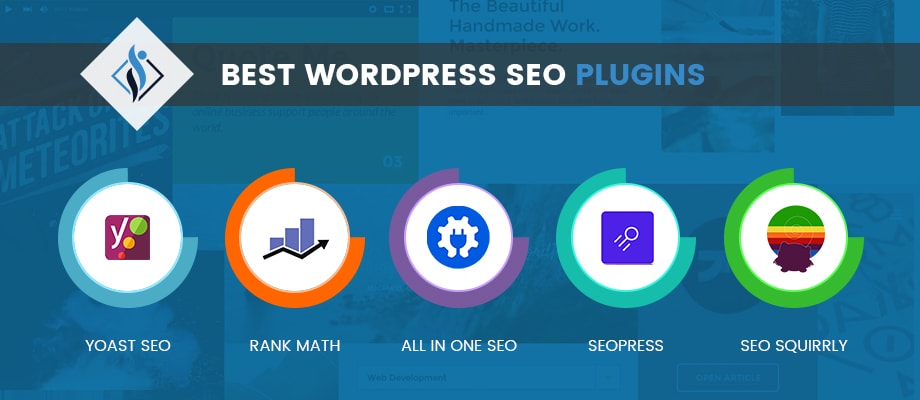
In addition, many CMS platforms support integration with SEO plugins such as Rank Math, Yoast SEO, and SEO Manager. On the other hand, some CMS have their own built-in SEO tools such as Wix SEO Wiz.
These tools are integral for SEO optimization, allowing for keyword analysis, automating SEO optimization tasks, and even providing suggestions on how to better optimize your page and improve your rank.
6. Plugins, Extensions & Integrations
CMS platforms can allow your site to be integrated with both built-in and third-party extensions and plugins. This can provide your site with additional functionalities that can make your site more interactive and dynamic.
With literally thousands of plugins available, you can mix and match extensions to provide your site the ability to process orders, send emails, integrate and share on social media platforms, view reports, and many more.
Extensions can be very helpful not just for your site’s viewers, but these are also essential for administrators and business owners. As such, the ability to utilize these extensions and plugins can definitely add more value to your site based on your business’ specific needs and processes.
7. Security Features & Maintenance
Another critical feature of CMS platforms is their ability to protect sites against security breaches, malware, and other forms of cyberattacks.
Several features that CMS usually offer include SSL encryption, which encrypts connections to make it difficult to connect without authorization.
CMS may also include 2FA authentication, a more secure method of logging in, as well as regular updates and patches to ensure that all vulnerabilities are covered against malicious content or breach attempts.
Lastly, many CMS provide regular backups, often on a daily basis, to ensure that data can be easily retrieved and recovered immediately to prevent data loss and in case of data corruption and other untoward circumstances related to data in the server.
Other CMS platforms, especially paid plans, offer enterprise-level security with advanced security protocols and features. There are also others that allow for integration of third-party security tools that can protect against unauthorized access, DDoS attacks, malware, and other forms of cyberattack.
Types of CMS Platforms
Content Management Systems come in many forms, each with its own specific attributes that make them best for specific needs and requirements. They also have their own advantages and disadvantages, often due to factors such as complexity, flexibility, cost, availability of features, and the like.
The two main types of CMS platforms that you will typically encounter are listed below. However, take note that there are other sub-types of CMS platforms as well as types based on function. These two types, on the other hand, are divided based on their basic structures.
1. Traditional CMS (Monolithic CMS)
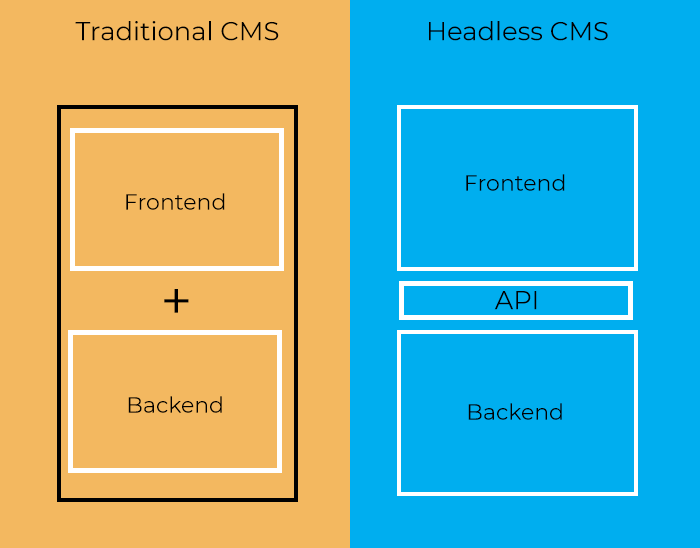
A traditional CMS, also known as a Monolithic CMS, integrates the content management component with the front end. This means that the view of the designer or content manager is similar with what your site’s guest will see.
The main advantage of a traditional CMS is that it is easy to manage content and customize designs in this type of environment. It is pretty much a “what you see is what you get approach” so non-technical users can easily manage and publish content.
Likewise, users can enjoy a user-friendly dashboard, numerous templates and themes, as well as plugins that will give your site its unique look and functionality without much fuss or cost.
A traditional CMS is best used for small to medium-sized sites and businesses with simple requirements such as blogs, e-commerce sites, or company websites.
However, a downside of a traditional CMS is its limited flexibility when it comes to third-party applications. It can also suffer from slower site speeds especially if numerous plugins are used or if all elements are loaded at the same time.
2. Headless CMS
A headless CMS, on the other hand, separates the front end from the back end. This means that the interface for content management is separate from what guests usually see.
This type of architecture is a lot more technical in nature, but enjoys the benefit of cross-compatibility with multiple platforms through the use of Application Programming Interfaces or APIs.
A headless CMS is best for those who want fast-loading content that can be used and scaled across various channels such as computers, mobile devices, and even smart devices through IoT technologies.
Compared to traditional CMS, headless CMS is much more flexible and can be used to design complex systems. However, a major drawback is that developers require intermediate to advanced coding and technical skills to implement customizations and designs
Why Use a CMS for SEO?
The main purpose of a Content Management System is to eliminate the need for manual coding, making design and customization of websites a breeze for those who lack the technical skills to do these tasks in the traditional way.
As such, there is no longer need for developers that can often incur high costs, and manhours required for creating, updating, and publishing content can be reduced significantly.
The usage of Content Management Systems worldwide is expected to reach over 23 billion U.S. dollars in 2025, according to a study by Statista. This translates to over 70% of all websites using a CMS, a testament to the widespread use of these types of software.
However, CMS platforms do not only offer the benefit of ease of use. CMS can also greatly impact SEO rankings by providing advantages and features that will affect search engine analysis and evaluation of SERPs.
Instead of hiring SEO managers, organizations can trigger campaigns of their own, helping their sites improve their online presence and allowing for greater reach across their intended audience.
A CMS can reduce the tasks required for SEO-related tasks through automation, letting business owners do more with significantly less time, effort, and cost.
Top CMS Platforms for SEO
1. WordPress
WordPress it the world’s most widely used CMS, used by over 40% of all websites in 2023, according to W3Techs. This is due to the platform’s flexibility, wide range of plugins and extensions, as well as its wide ecosystem of users and experts, which means that there is a strong WordPress community where you can get support.
WordPress also has numerous features that help your SEO requirements. In fact, studies have shown that sites developed in WordPress typically rank higher than those developed using other CMS.
Tools that can be integrated in WordPress that can help you with SEO include Yoast and Rank Math. The platform can also create permalinks, metadata, and structured data through the use of plugins of which there are several choices.
WordPress is a platform originally created for blogging. This makes WordPress great for blogs and company sites. It can also be integrated with e-commerce tools like WooCommerce for online shopping capabilities.
However, too much reliance on plugins can drop performance, so more complicated sites that require more complexity may need other solutions when it comes to content management and site development.

2. Shopify
Shopify is a CMS made specifically for e-commerce sites, with built-in integration for product and store management, check out, payment systems, and intuitive sales dashboards.
This allows sites that utilize Shopify to set up an online store without the need for extensive technical knowledge. Processes and codes are automatically streamlined for computers and smaller screens, assuring a good browsing experience that can help your SEO rank.
Shopify is also very SEO friendly as it has the ability to automatically generate XML sitemaps. They also provide free SSL certificates as well as plugins like SEO Manager and Plug In SEO which can further help optimize your site.
Shopify is the most popular CMS for online shopping sites due to the reasons mentioned above due to its benefits to SEO. In fact, studies have shown that sites that use Shopify rank higher than those who do not.
If you need a CMS specifically built for e-commerce that offers you ease of use as well as a centralized dashboard that can provide you with customizable sales and order tracking information and can be used across multiple devices, then Shopify will definitely be the best pick for you.

3. Webflow
Webflow is a powerful CMS that has numerous built-in features that can help with SEO. These include control over metadata, scheme markups, as well as a streamlined infrastructure that uses mainly built-in tools that can help optimize pages and make them perform faster than other sites.
Despite a steeper learning curve, non-designers can still be able to grasp how to design and use the tools available within the software to ensure that their sites look and function the way that they intended them to be.
The platform offers quick customization features that are compatible with both computer and smaller screens, with many functions automatically done by default while still leaving space for manual editing and tweaks. To round it all out, Webflow also offers free SSL certificates for increased site security.
Webflow may require some more time to learn and may cost a bit more than other platforms, but its impact on SEO cannot be matched, making Webflow the CMS of choice for those who want to reach the top of SERPs.
In fact, sites developed using Webflow usually rank higher when compared to those using other platforms such as WordPress, especially when considering Google Core Web Vitals scores.
This makes Webflow a top-tier choice for sites competing for high-demand keywords without compromising flexibility in design and functionality.

4. Wix
Wix is a platform that is vest for beginners, allowing users to create robust and aesthetically pleasing sites through its easy-to-understand drag-and-drop mechanics and built-in tools that can make your content stand out.
Developing and designing sites using Wix requires no technical and coding knowledge, and is build-in SEO Wiz tool is easy to understand as it provides a guided approach to the steps required for SEO optimization.
Some of the features of Wix that help SEO include automatic XML sitemap generation, default mobile optimization, schema markup generation, and many more.
Wix also has AI generation tools that can help you generate a whole website with just a few clicks. Built-in features and security tools also make Wix a one-stop ship for everything that you need to create basic to mid-level sites with ease.
Some drawbacks of Wix include less scalability and limited customization and functionalities that may be required for more complex sites or those that experience higher traffic than usual. Still, for basic needs that can meet demanding SEO requirements, Wix remains a top choice despite these shortcomings.
5. Drupal
For those who want enterprise-level sites, you will require an enterprise-level CMS. Drupal can provide just that with its ability to create complex sites with a wide range of functionalities through both built-in and third-party integrations and tools.
Drupal is used by government agencies, universities, and numerous large corporations due to its robustness and scalability. Features include advanced SEO capabilities and automated features which allow for full control of metadata, URL structures, and various SEO tools.
Drupal also has built-in caching, CDN integration, and high levels of security that are regularly updated. All these features result in sites created with Drupal to have a significant SEO advantage over others.
Of course, with these features come certain drawbacks. Drupal is commonly not used by beginners as many features require manual coding and technical know-how, especially when it comes to customization and integration. The environment also has less pre-built templates and plugins than usual.
Still, in the right hands Drupal is one of the most power CMS platforms that you can find, ensuring scalability, flexibility, and SEO optimized sites that can perform in any platform regardless of scale or demand.

What Makes a CMS Good for SEO?
There are many ways that CMS platforms can help a site’s SEO rank. By improving different factors that are used by search engines such as Google as a basis for rank, CMS can provide a distinct advantage for those that use these types of services when it comes to SEO optimization.
A good CMS for SEO can provide, among others, the following benefits.
1. Fast Loading Speed
Fast site speeds are a crucial ranking factor for SEO. Slow speeds are directly proportional to poor user experiences and high bounce rates, which can severely impact your SEO rank.
Conversely, fast loading sites, considered to be those that load within 3 seconds, enjoy high conversion rates and overall user satisfaction scores.
Search engines like Google reward these kinds of sites, so having CMS software offer features that reduce loading times such as image optimization, CDN integration, caching, and automated optimization tasks can be a huge advantage for your site.
2. Mobile Optimization
With search engines such as Google heading towards mobile-first indexing, the race is on for sites to get optimized for mobile devices such as phones and tablets.
A CMS that can automatically adapt themes, images, navigation, and other elements of you site for smaller screens is a huge plus, especially as search engines are now prioritizing user experience on mobile devices now more than ever.
As mobile web traffic comprising over 60% of total web traffic worldwide according to Statista, optimizing for mobile devices is a critical operation that must be included for all sites, and numerous CMS platforms are capable of offering these features with minimal cost and effort required.
3. Customizable URL Structures
URL structures that are clean and keyword rich will also benefit from higher SEO ranks. A URL which clearly defines the nature of the page that it will redirect to is considered to be better structured when compared to URLs with a combination or random letters and numbers.
Studies have shown that those with structured URLs rank better than others. CMS platforms which provide this type of functionality can be very helpful especially as it can automate the customization of URLs which would therefore help your chances of ranking higher.
4. Metadata Control
Optimizing metadata such as title tags, header tags, and meta descriptions are also important when it comes to SEO optimization.
It is easy to make mistakes when coming up with the correct metadata. However, many CMS platforms are now capable of using AI and other technologies to help create these data for you by analyzing your content and customizing the metadata based on your preferred keywords.

5. Security Features
Sites that are secure also perform well when it comes to SEO ranking. HTTPs-enabling, SSL certificates, and regular security updates are just some of the features that will help improve your rankings.
CMS platforms often provide these as part of their basic packages. Not only will these help your rank, but security features can also help protect you against system vulnerabilities and cyberattacks that can harm you in a large number of ways.
6. Others
Other ways that CMS platforms can help in SEO include schema implementation, automatically XML sitemap generation, as well as access to editing robots.txt files. These can come either through built-in tools or through third-party extensions or plugins.
These elements can help search engines understand your content easier, and this will be used in your favor when evaluating SEO rank. The ability of CMS to ability to generate and update these for SEO purposes can help your site immensely to be more visible.
Conclusion
Content management systems are not just for web development and maintenance. Truly effective CMS platforms can also significantly impact SEO rankings.
By positively impacting factors such as load speeds, metadata, link structures, and others, your SEO rank can greatly improve at a pace that traditional wed development cannot match.
Many CMS platforms are available in the market today, with some more popular than others. All have their pros and cons regardless of their popularity, however, and the overall best CMS may not necessarily be the best one that will fit your specific needs.
Out of all the CMS platforms that we have reviewed, WordPress remains as the most used and is considered as one of the best overall. Still, different CMS can be considered as better depending on your organization’s use case.
Regardless, proper use of a CMS has as much importance as the actual service that you would utilize. When done right, you will definitely be rewarded not only with a functional and aesthetically pleasing site.
Not only that, but you would also get an SEO-optimized site that can enjoy benefits such as high online visibility, good conversion rates, and increased brand reputation, credibility, and trust.
